 |
Marsico
Hall Microscopy
Fellowship
(MHMF.ORG) |

 |
|
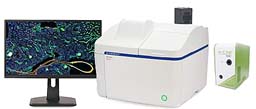
Olympus Apexview1000 - Bench Top Microiscope
|
|
Location:
Marsico Hall 7229N
|
|
Notices:
- The slide scanner system is for use by
researchers in the Marsico Lung Institute and their colleagues and
collaborators
- All users are
required to receive training or instruction from Michael before using the
system
- Ultimate permission to use the system is at the discretion of
the MLI/CF Center Director
- All users should log in with their own account (local)
-
OlyVIA 4.2.1
free viewer will install on Windows
Apexview100 booking Calendar:
Apexview 100 version 4.4.1 Notes:Load slides/dishes/flask/microtitre
plate into appropriate tray Load
tray into right side to scanner. Note orientation of notch.
|
|
Points to note:
- Cleaning off immersion oil:
- The 60x 1.35NA objective needs to be cleaned after use. Use
oinly lens tissue, not kim wipes etc.
- After 60x oil immersion scanning is done the tray will need to be
removed (see Exchange Trays) and the oil cleaned off before more
scanning can be carried out with other objectives
- If you encounter problems please note error code or messages. Take
a screen shot or cell phone picture - briefly note what you were doing
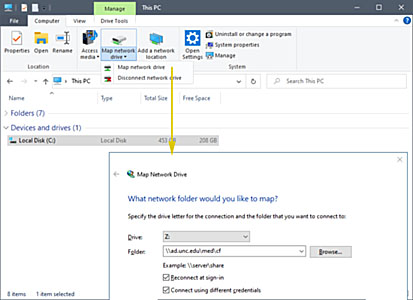
Mapping Drive Letters to servers (connecting to
a serer, e.g. \\Minsky or CF-shared or CF-groups):
- See
http://microscopy.unc.edu/shares
on how to connect to e.g.:
- \\minsky.med.unc.edu\vs200, \\minsky.med.unc.edu\vs120,
\\minsky.med.unc.edu\vs320
- CF-shared, CF-groups, \\ad.unc.edu\med\cf\shared,
\\ad.unc.edu\med\cf\shared
- Shared/groups in your department and other file server shared directories
`
Important
Considerations:
- If you remove
a slide tray with any slides with immersion oil present (60x scans)
belonging to the previous user or to yourself please:
- Choose this
objective cleaning mode from the home page to
bring the 60x to a position where it is easily cleaned.
- Blot the 60x objective with lens tissue before
starting your scans
- This will help prevent
oil from dripping into the system or onto other slides.
General Considerations:
- Store scans on the D: drive. In an emergency data may be stored on C:. Avoid
using the C: drive
and desktop.
- Olympus states not to scan directly to mapped network drives.
Scanning to mapped drive letters slows down scanning. Data corruption is possible when the data
stream is disrupted by network traffic jams or transient disconnections.
- Connecting to a server
(mapping to a driver letter) e.g. CF Shared
- It is best to scan to D: and copy files later to servers.
Covid-19 Mitigations:
The System:
- 6 Slide holder - 3" by 1" slides 1.0 mm thick. Covers Slip should
be #1.5 (170 um)
- Transmitted light - LED lamp
- Fluorescence - 6 channel DAPI like, FITC like, Rhodamine like, TexasRed
like, CY5 like & CY7 like, slot space available for future upgrade e.g. CFP
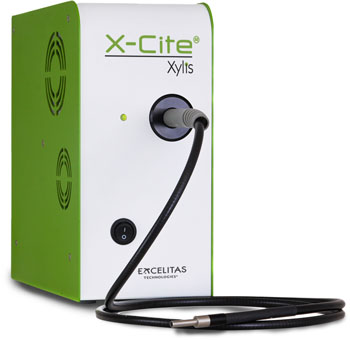
- LED Fluorescence light - X-Cite
Xylis XT720S
- Fluorescence - DAPI, FITC, CY3, CY3.5 (mCherry), CY5, CY7
-
| Position |
Channel |
Ex (nm) |
BS (nm) |
Em (nm) |
Cube |
|
Similar fluorophores |
| 1 |
transmitted |
|
|
|
none |
|
|
| 2 |
DAPI |
392/23
(380-404) |
409 |
447/50 (422-472) |
LED-DAPI-A-OMF |
|
Hoechst |
| 3 |
FITC |
474/27
(460-488) |
495 |
525/45
(502-548) |
LED-FITC-A-OMF-ZERO |
|
GFP, Alexa 488, CY2,
Opal 520 |
| 4 |
TRITC |
554/23
(542-566) |
573 |
609/54
(582-636) |
LED-TRITC-A-OMF-ZERO |
|
Opal 570, CY3,
Alexa 555 |
| 5 |
mCherry |
578/21
(567-589) |
596 |
641/75 (604-679) |
LED-mCherry-A-000-ZERO |
|
Alexa 594, Opal 620, Texas Red |
| 6 |
CY5 |
635/18
(626-644) |
652 |
680/42 (659-701) |
LED-CY5-A-OMF-ZERO |
|
Alexa 633/647, Opal 650, Draq5 |
| 7 |
CY7 |
735/28
(721-749) |
757 |
809/81 (706-850) |
LED-Cy7-A-000 |
|
CY7Alexa 750, Opal 750 |
| 8 |
spare |
|
|
|
none |
|
|
- CMOS camera fluorescence - Orca
Fusion
sCMOS camera
- Color camera for transmitted light/chromogenic sample imaging - Evident
DP72
- Macro camera for sample overview and label reader. Transmitted
only
- Slide label reader for Bar codes & QR codes
- Objectives:
- 4x
- 10x
- 20x lwd
- 40x lwd
- 60x 1.4 NA oil immersion
| Objectives |
| Mag. |
NA |
type |
WD |
corrections |
cover slip |
Immersion |
Pixel size
monochrome/Orca-Fusion |
Pixel size
color camera |
| 2x |
0.06 |
PLN * |
5.8 mm |
- |
#1.5 |
dry |
3.25 um |
2.738 um |
| 4x |
0.16 |
UPLXAPO |
13 mm |
- |
#1.5 |
dry |
1.625 um |
1.369 um |
| 10x |
0.40 |
UPLXAPO |
3.1 mm |
- |
#1.5 |
dry |
0.650 um |
0.5476 um |
| 20x |
0.80 |
UPLXAPO |
0.60 mm |
- |
#1.5 |
dry |
0.325 um |
0.2738 um |
| 40x |
0.95 |
UPLXAPO |
0.18 mm |
coverslip thickness |
0.11-0.21 mm |
dry |
0.1625
um |
0.1369
um |
| 60x |
1.42 |
UPLXAPO O |
0.15 mm |
- |
#1.5 |
oil 1 |
0.1083 um |
0.09127 um |
1 Standard immersion
(carbon) oil (RI=1.515)
* Not suitable for CY5 or CY7
Viewing Software:
- OlyVIA is the fastest and most convenient way to review scans. Limited processing
capabilities. Only for Windows
- OlyVIA 4.2 for
Windows 11 & earlier
- Available
at D:\_OlyVIA_4-2
- Copy installation files to C: drive (Best not to install from a
drive letter mapped to a network drive).
Administrator privileges are required to install
it on your computer.
- OlyVIA 3.4.1 for Windows 10
- Copy installation files to C: drive (Best not to install from a
drive letter mapped to a network drive).
Administrator privileges required to install
it on your computer. If your computer is joined to the AD domain
(onyen sign in) contact OIS. If your computer is on the MHmicroscopy domain sign in contact
michael.
- Also available at
https://www.olympus-lifescience.com/en/software-download/
(Registration required)
- OlyVIA version for Windows 11 installation is available use
version 4.2. However OlyVIA 3.4.1 can be
install in Windows 10.
- FIJI for processing, quantitation and analysis
on Windows, macOS, Linux - Ask michael for tips
- VisioPharm pathology
software
- QuPath pathology software
Using the system:
- Quick startup/shut down
guide - ask Michael for a copy
- Powering up:
- Power on at bottom right of smaller box - green light will be lit
- LED
light source - X-Cite Xylis
- B/W camera
- Note: fluorescence light & B/W camera must be on
even if transmitted light imaging is being carries out
Network connections: